A day of work on beta testing — making life easier for testers (and ourselves)
Today I focused on one topic: make it easier for people to join Zielna Manufaktura beta testing and have insight into whether they're actually using the app. Quite a few changes came out of this, I'll describe the four most important ones.
MarekZ
1. Step-by-step instructions on the /beta page
Users who previously signed up often disappeared afterward — they received an email with a Google Play link but didn't know what to do next. Now the form on zielnamanufaktura.pl/beta includes:
- "How it works — step by step" — four steps from registration to becoming a Founding Tester, before you even decide to join.
- A "How it looks in practice" section — real Google Play screenshots showing what happens after clicking the link. You can click and enlarge them.
- Direct link to the Google Play testing program — for those already approved who want to install the app right away.
- "Good to know before registration" — requirements list (Gmail, Android, 14 days) and contact info.
2. Manual activation + new activation email
Previously: you register → you're active immediately → but Google Play doesn't know you yet → you try to install → nothing works. Chaos.
Now: you register → you get an email "You're on the list, please wait" → I manually add you to Google Play Console and flip a switch → you get a second email "Account activated!" with an installation link. The link will work because Google already knows you.
I also rewrote both emails in a more human tone. If you ever receive a message from me about Zielna Manufaktura, it will sound like a message from someone who weeds tomatoes, not from an automated system.
3. Admin panel shows what testers actually do
For me as admin — now on /admin/beta I can see for each tester:
- whether they created an account in the app (email matching in User database)
- when they were last active in the app (with colored badge: green <3 days, yellow up to a week, red beyond)
- how many plants, gardens, journal entries, tasks they have
The backend updates lastActiveAt with every API call (with 5-minute throttling to avoid spamming the database). For the first time, I can actually see who from the active tester list is really testing and who registered and forgot.
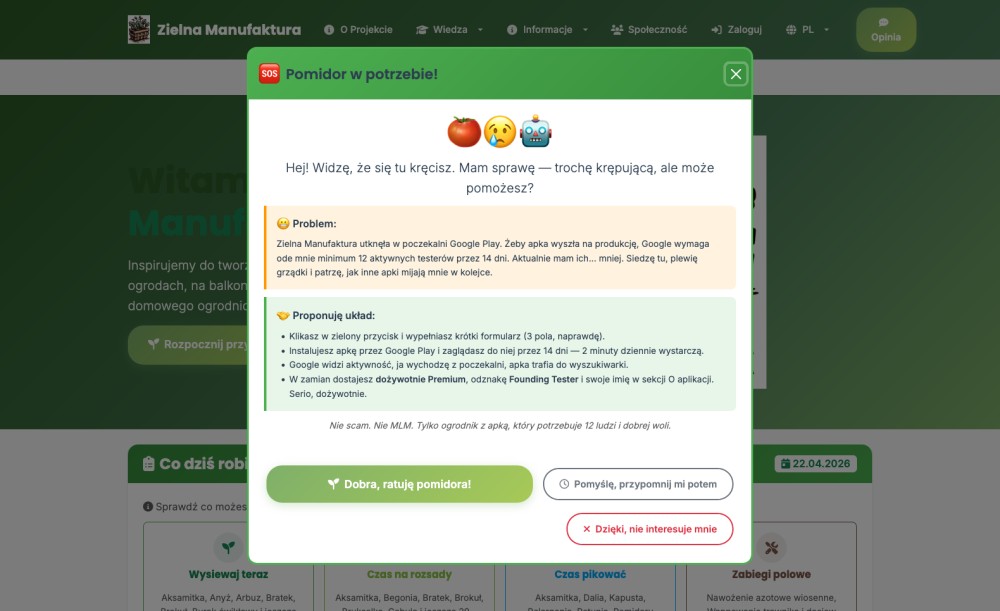
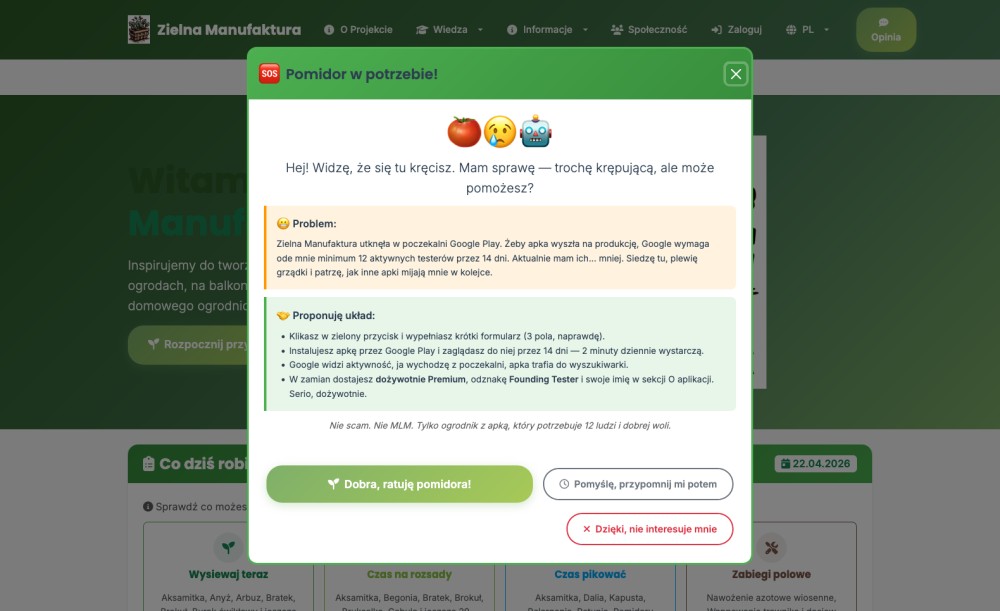
4. Homepage popup: "Tomato in distress"
To increase the chance that new visitors learn about the testing program, I added a popup that appears 8 seconds after entering the homepage. The tone is slightly dramatic and self-deprecating — because pretending to be a serious business when someone is looking for 12 people on Google Play would come off strange.
The popup has three exit paths: "Alright, I'm saving the tomato" (link to the form), "I'll think about it, remind me later" (returns on next visit) or "No, thanks" (disappears permanently). If you close it with the X — by default I postpone the topic for later, I don't sentence you to a lifetime without this message.
Why all this? Google requires 12 active testers for 14 days before an app can go to production. We're halfway there. The simpler the process and the more I can see what's happening, the faster I can close this stage and Zielna Manufaktura will finally reach the Google Play search engine.
If you're not in the program yet — zielnamanufaktura.pl/beta. 14 days of testing = lifetime Premium and your name in the "About the app" section. Thanks.
Photo Gallery 1
Comments 0
No comments yet. Be the first!